
Managing your paperwork is an important part of your real estate transaction, and Beycome gives you full control. Whether you need to update your closing date, learn how to add a document on your dashboard for review, or simply stay organized, everything starts in your profile.
When you connect to your Beycome dashboard, you’ll find a dedicated area for managing documents tied to your property. This makes it easy to upload agreements, add disclosures, and share updates with the buyer or title company. It also helps keep your file complete without email chains or messy paperwork. Having your documents in one place ensures your transaction moves smoothly. It also gives everyone access to what they need, when they need it.
If you ever need to change your closing date or add a new document, the process is simple. Log into your profile, navigate to your property, and upload the necessary form or proof so our team and the other party can review it. This keeps everything transparent and secure. It provides you real-time control over your deal.
Connect to My Profile for guidance on how to modify your closing date on beycome.
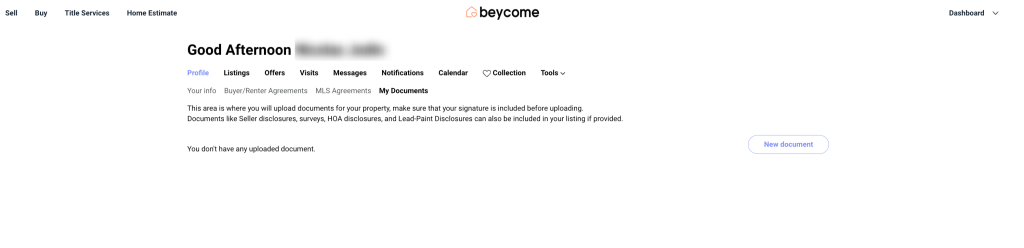
On the menu select “My Documents”
In “New document” choose the property address of your property.
Select the ” Type of document” then “Upload your document” Press “Upload” to validate.
That’s it. Once uploaded, the document becomes part of your transaction file and can be referenced whenever needed. Using your dashboard to manage closing changes and documents helps prevent delays and keeps your deal organized. It gives you a professional-level system without extra fees or complexity.
Important:
Our service representative will update your property after receiving the information. Additionally, understanding how to add a documents on your dashboard will streamline this process. After we update on our end, our syndicated website partners and MLS require 1 to 2 business days to populate.
For security purposes, we need to be notified by you via your Beycome account only to adjust your listing with your modifications. Clearly knowing how to add a documents on your dashboard ensures these adjustments are accurate. We cannot accept any change requests by email or phone call.
Discover more: