
When you upload photos to your Beycome listing, every image goes through an automated validation process before it is saved. This happens because each MLS has its own strict rules about what photos are and are NOT allowed — and violations can result in fines to the broker, delays going live, or your listing being pulled from the MLS entirely.
To protect your listing and get you on the market as quickly as possible, Beycome checks your photos automatically at the time of upload. If a photo is rejected, it means one or more of the criteria below were not met. This page explains exactly what is checked, what gets blocked, and how to fix it.
Photo examples
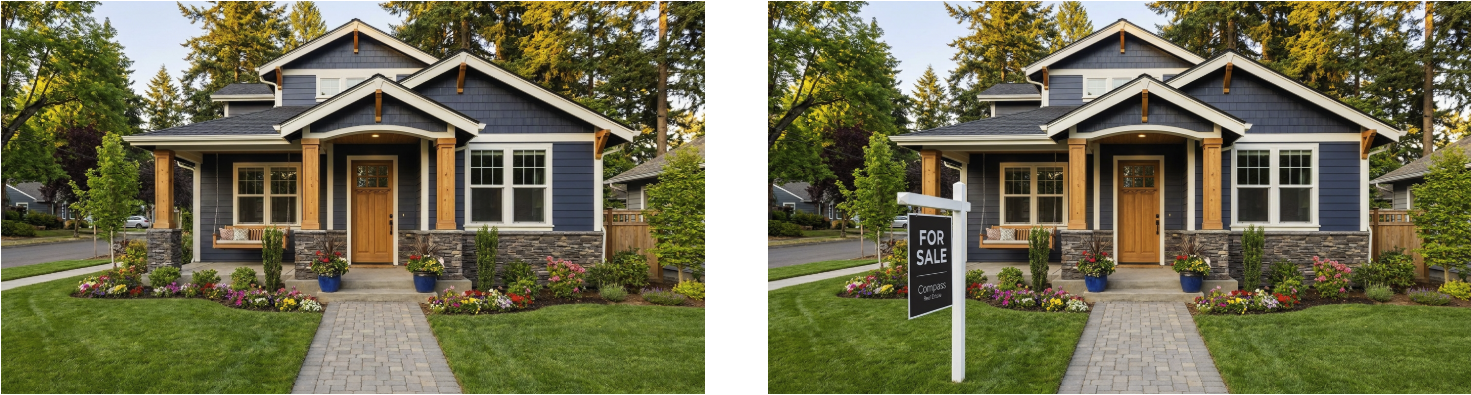
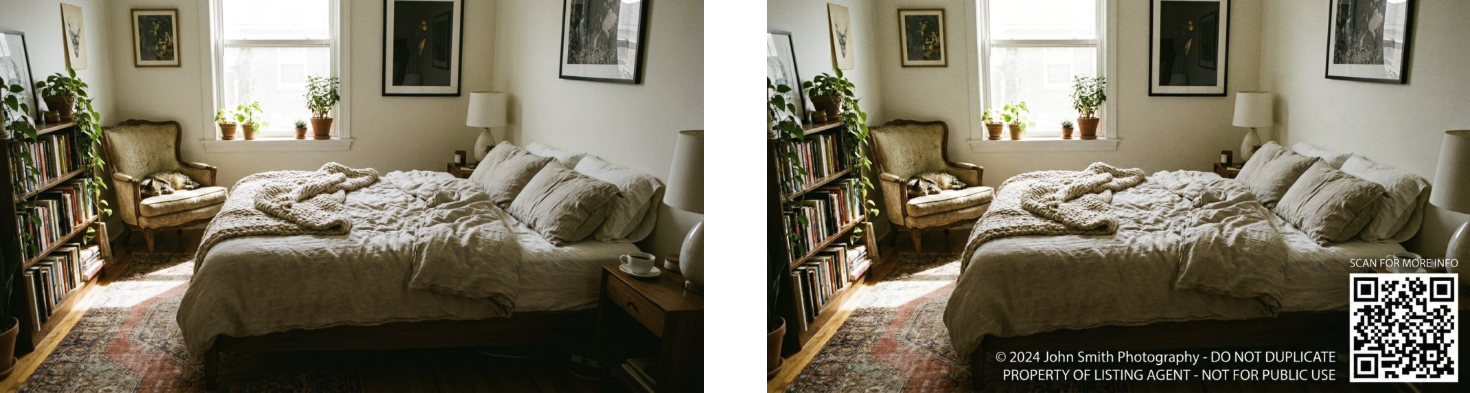
The examples below show the difference between a compliant photo and one that will be rejected. Each pair uses the same property; only the violation changes.
| Good | Bad |
- Yard sign:
- Copyright & QR code:
- Flags:

- Watermark:
- Human silhouettes:
- Contact information:
What gets a photo blocked
The following issues will prevent a photo from being saved to your listing. If you see an error on upload, one of these is the most likely cause.
Automatically blocked:
- Watermarks, copyright notices, or QR codes
- Visible yard signs or real estate signs
- Items that may distract from the home, such as political, sports, or large decorative flags.
- Human faces, silhouettes, reflections, or shadows of people
- Phone numbers or contact information visible in the photo
- Copyrighted or stock images (checked via reverse image search)
- Nudity, explicit, or offensive content
- Logos or cartoon images
- Screenshots or canvas images
- Digitally altered images (beyond standard virtual staging — see below)
- File is not a valid image
- Image is below minimum resolution (640 × 480px)
Flagged (may require attention):
- Pixelated or poor image quality
- Too dark, too bright, or heavily color-saturated
- Virtual staging or digital renderings — allowed, but must be marked on your listing per MLS rules
- Floor plan images — treated as a separate category from standard property photos
- Map, satellite, or street view screenshots
- Animals visible in the photo
- Religious or political objects visible
My photo looks fine: why is it still flagged?
Even if your photo passes every visual check, it may still be rejected if we find the same image already published somewhere else online. Beycome runs a reverse image search on every upload. If there is a match — on a stock photo site, another listing, a rental platform, or anywhere publicly accessible — the photo cannot be used. The MLS requires all photos to be original to your listing.
To avoid this, only upload photos taken specifically for your listing. Do not reuse photos from old listings, Zillow, Redfin, or any other website — even if the property is yours.
The first photo must be an exterior shot
Nearly every MLS requires that the first photo in your listing be an exterior view of the property. This is a MLS rule, not a Beycome preference, and it applies to nearly every MLS we work with.
What counts as a valid first photo: The front facade of the building, an aerial view of the property, or a water view. What does not count: a photo of a swimming pool alone, any interior shot, or a rendering that does not clearly show the building exterior.
If your listing is land or a new construction without a completed structure, an aerial or lot photo is acceptable. If you are unsure whether your first photo qualifies, a straightforward front-of-property shot taken from the street is always a safe choice.
Left image passes all checks. Right image (look closely) there is a cat and a watermark in the bottom left corner, making this image forbidden from the MLS.
Before you re-upload — a quick checklist
- Crop out any yard signs, open house signs, or banners before uploading.
- Review each photo carefully for reflections — mirrors, windows, and shiny surfaces can capture a person’s reflection without you noticing.
- If your photographer delivered photos with a watermark, request the clean version. Most photographers provide both.
- Export photos as standard JPEG at 640 × 480px minimum. Most modern smartphones exceed this easily.
- Keep file size under 30MB per image. For most photos, standard JPEG compression is well within this limit.
- If you are using virtually staged photos, that is allowed — just make sure you disclosure which ones.
Still having trouble?If your photo continues to fail after reviewing the checklist above, contact our support team at support@beycome.com and include the photo you are trying to upload. We can usually identify the issue quickly.