
rtance If you decide to cancel or delete your property listing, you must update the listing status directly from your Beycome account. This process keeps your information secure and ensures compliance with MLS® and syndication rules. Whether you purchased a Flat Fee MLS package or listed only on Beycome.com, you must complete this step to remove the listing properly.
Step 1: Log in to your Beycome dashboard
Start by logging into your Beycome account. Always use your own login credentials. For security reasons, Beycome only accepts listing changes submitted directly through the account holder’s dashboard. This protects your property and prevents unauthorized updates.
Once logged in, locate the listing you want to cancel or delete.
Step 2: Update the listing status
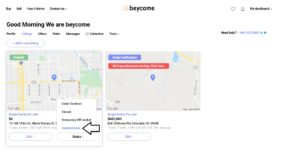
From the main menu, click on Status and select Delete/Cancel. This option starts the official cancellation process and signals that you want to remove the property from active marketing.
Step 3: Review and sign the release documents
After selecting Delete/Cancel, carefully read the Release and Cancellation of Listing Agreement. This document confirms that you authorize the removal of your listing. Sign and certify the agreement directly within your account to move forward.

Step 4: Listing status update and processing
After you submit the signed release, one of our customer service representatives will review your request and update your property’s status. Once we complete the update on our end, the change will begin to populate across our syndicated website partners and the MLS®.
This process usually takes one to two business days to reflect across all platforms.
Important security notice
For security and compliance reasons, Beycome can only process listing changes submitted through your Beycome account. We cannot accept cancellation or modification requests by email or phone call. This rule protects your listing and ensures that only the property owner controls status changes.
When this action is required
You must complete this cancellation process if your home was listed on Beycome.com, regardless of whether you purchased a Flat Fee MLS® package. Completing the steps above ensures accurate records and a smooth removal of your listing from all platforms.