
In My Dashboard > Listings, open your listing’s Status menu, choose Temporarily off market, enter your name to certify the change and click Update status. Your listing comes off the MLS and partner sites but stays intact, so you can reactivate it anytime. Most MLSs allow a pause of 14 to 30 days. Changes show within about an hour, up to 2 business days.
Selling your home? List it on the MLS with Beycome for $99, with $0 due to Beycome at closing.
Here’s how to pause property listing:
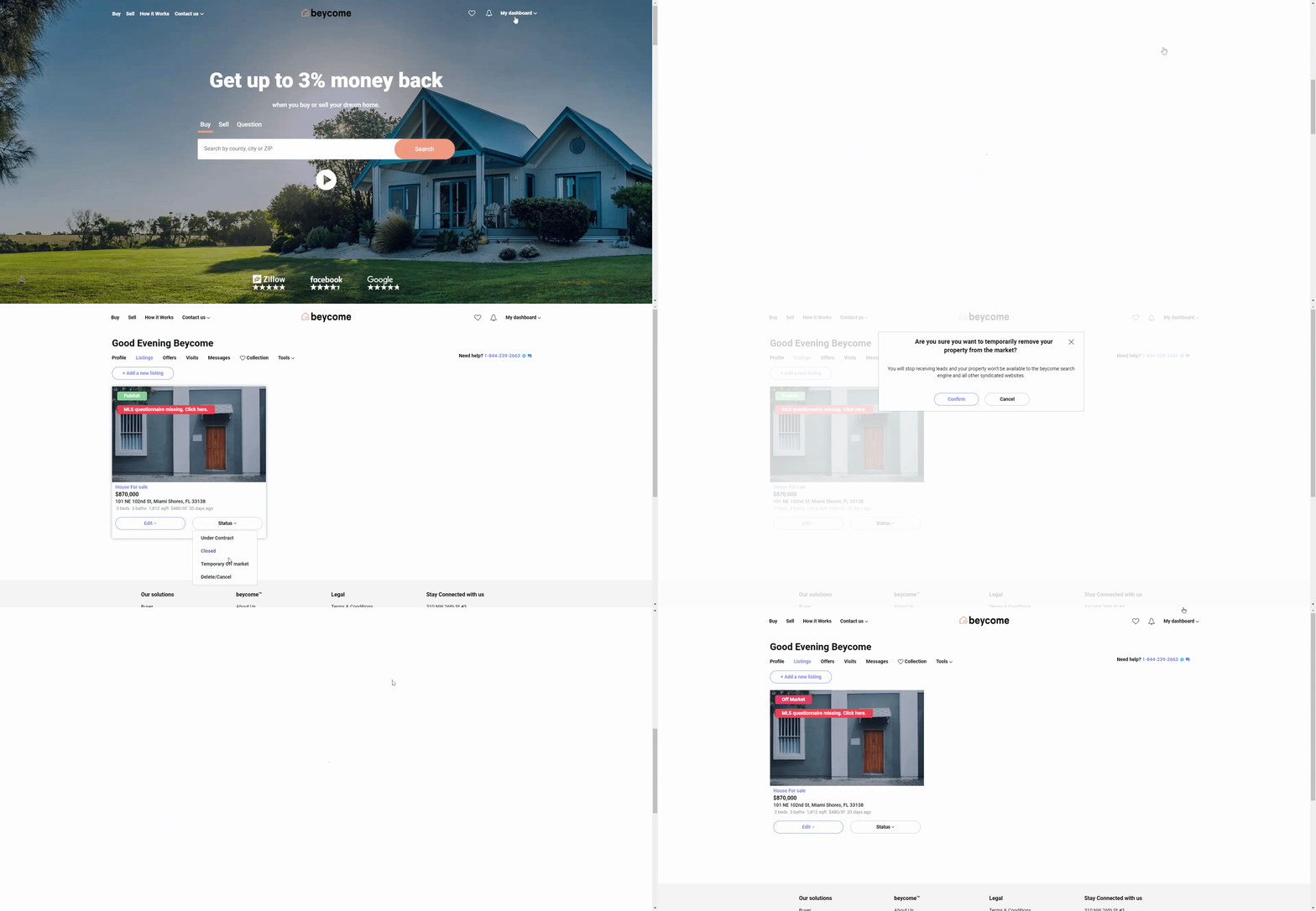 Step 1: Connect to My Dashboard
Log in to your Beycome account, open “My Dashboard” and go to Listings.
Then step 2: Update the listing status
On your listing, open the “Status” menu and select “Temporarily off market” to pause your property listing. (This option isn’t available for listings on Georgia MLS.) If your listing is on the MLS, enter your name in “Name of person certifying this change”.
Step 3: Confirm the pause
Click the “Update status” button to complete the pause request.
What happens next
Once you submit your update through your Beycome account, our team will review the request and adjust your property’s status accordingly. This process is typically handled quickly, but timing may vary slightly depending on the type of update and MLS requirements.
After the change is made, it will begin syncing across the MLS and all syndicated platforms, including major real estate websites. In most cases, updates are reflected within as little as one hour, but it can take up to two business days for all platforms to fully refresh and display the new status. Each website has its own update cycle, so slight delays between platforms are normal.
During this time, your listing remains active or paused based on the latest confirmed status in the MLS. Once the update is complete, buyers and agents will see the most current information when viewing your property online.
Important reminder
For security and compliance reasons, all listing updates must be submitted directly through your Beycome account. This ensures that only authorized users can make changes to a property listing and helps maintain the accuracy and integrity of the information displayed across the MLS.
We are unable to process modification requests sent by email, phone, or any other external communication channel. If you need to make a change, simply log in to your account, navigate to your listing dashboard, and submit your request through the appropriate section.
This process protects your listing and ensures that all updates are properly tracked, verified, and applied in accordance with MLS rules and regulations.